
On This Page
Auto Commenting — Reviewing AI-Generated Reports
A report workspace that keeps finance teams in control of AI-generated commentary.
My role: UX design · Duration: 5 months
Team: Product owner, solution architect, 2 developers, UX designer
My contribution: I focused on the report configuration flow, screen layout, saved settings, and review experience, working with finance stakeholders and developers.
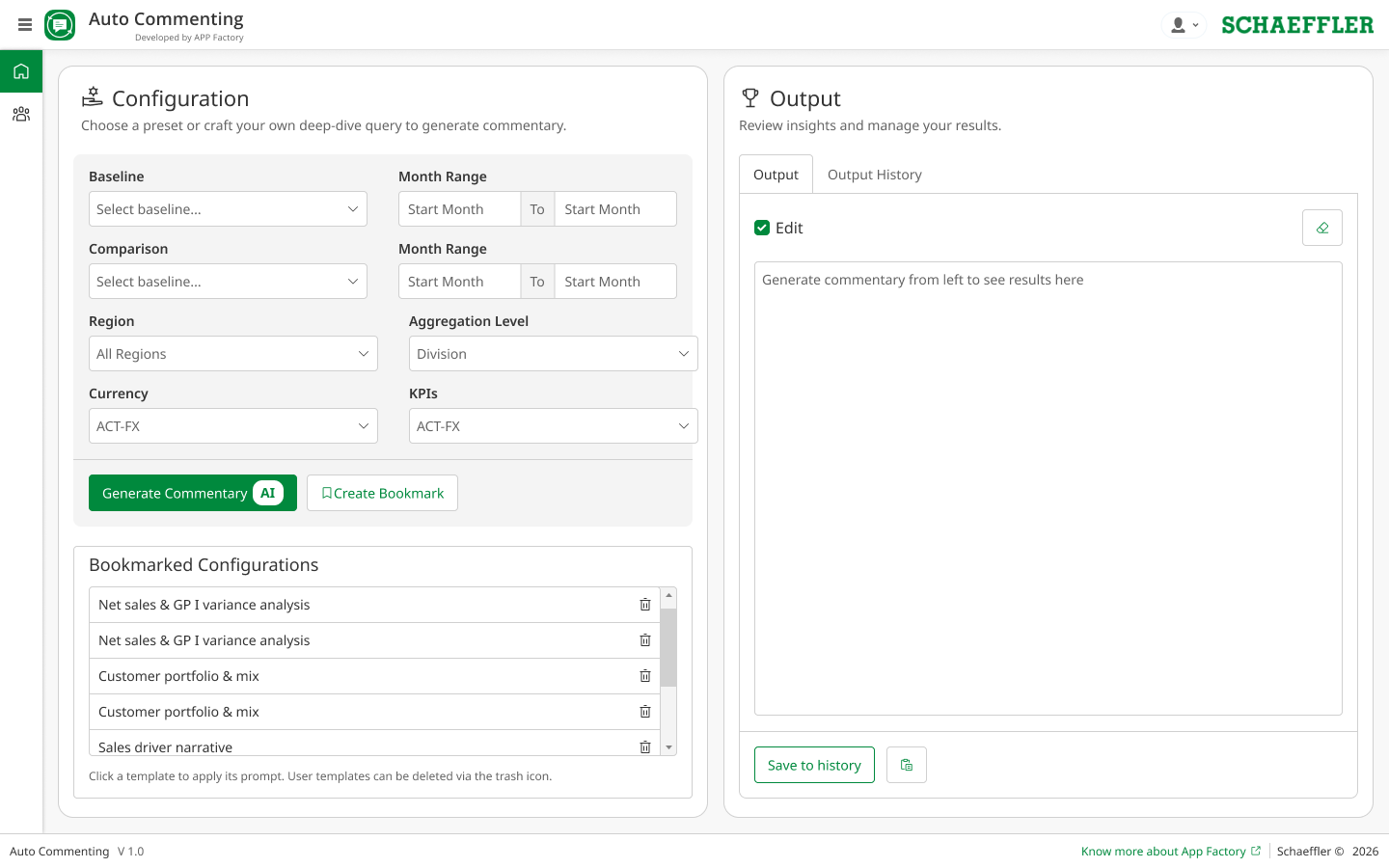
Sensitive company details are redacted. .
The Problem, at a Glance
Repeated setup and AI drafts disconnected from their inputs.
Visible settings, editable commentary, and saved report history.
What I Learned
Research with pricing analysts and controllers highlighted repeatable reporting tasks. Users needed familiar controls for dates, currencies, and business units, rather than repeatedly writing prompts.
- Keep the selected reporting periods visible beside the draft.
- Let analysts reuse settings for recurring reports.
- Make it easy to edit, copy, and revisit generated commentary.
Usability Priorities
- Check required inputs and date ranges before generating a report.
- Show which settings produced each draft.
- Support review and editing instead of treating generated text as final.
A Clearer Workflow
- 01
Choose Inputs
Set the periods, currency, and region.
- 02
Generate a Draft
Keep the settings visible beside the output.
- 03
Review and Edit
Check the commentary before sharing it.
Key Design Decisions
Grouped Inputs
Keep dates, currencies, and regions organized.
Saved Settings
Reuse configurations for recurring reports.
Editable Drafts
Refine the text without generating it again.
Simple Handoff
Copy reviewed commentary into a report.
Working with Developers
The interface uses shared Figma and Mendix design patterns. I worked with developers on the input controls, editable output area, and feedback for validation and generation states.
Input validation helps catch configuration mistakes. It does not guarantee that AI-generated commentary is correct; analyst review remains part of the workflow.
The Result
The design connects report setup, draft generation, editing, and history in one workflow. Finance teams can see the inputs behind a report and retain control over the wording before sharing it.
What I Would Carry Forward
AI-assisted work needs visible inputs and an explicit review step. Saved settings and editable drafts make the tool fit recurring reporting work while keeping responsibility with the analyst.